Build a Private LLM Mesh with rstream
Run local LLM workers across laptops, workstations, and GPU servers, then use rstream for connectivity, discovery, routing, and narrowly scoped access from a Next.js agent application.
Local inference usually starts with one model server on one machine. The next step is less direct: the useful compute may be spread across a laptop, a workstation, and a GPU server, while the application using it runs elsewhere. Those machines are often behind NAT and should not expose an inference port to the Internet.
This guide builds a small worker pool around that problem. Each worker runs an OpenAI-compatible model API on its own machine and opens an outbound rstream tunnel. A Next.js application discovers the workers from their tunnel labels, chooses one that serves the requested model, and reaches it with a short-lived token scoped to one endpoint.
rstream is the connectivity and authorization layer in this architecture. llama.cpp or Ollama loads the model, the Vercel AI SDK runs the agent turn, and the application owns the routing policy. Keeping those responsibilities separate makes it possible to change the model runtime without changing how remote workers join the pool.
rstream examples / private-llm-meshOpen the Next.js application and the two local worker implementations.Clone the sample on the machine that will run the application:
git clone https://github.com/rstreamlabs/rstream-examples.git
cd rstream-examples/private-llm-mesh
Architecture
The browser talks only to the Next.js application. The application authenticates the user, runs the agent loop, selects a worker, and streams the result back to the browser. Model requests travel from the application to the selected worker through a token-protected rstream endpoint.
Browser
   |
   | HTTPS and streamed chat response
   v
Next.js application
   |  authentication, agent loop, tools, worker selection
   |
   | HTTPS with a short-lived token for one worker and one path
   v
rstream edge
   |
   | existing outbound tunnel
   v
Local worker pool
   |-- llama.cpp worker on a laptop or workstation
   |-- llama.cpp worker on a GPU server
   `-- Ollama worker published by the Docker reconciler
Each worker publishes the labels role=llm and app=private-llm-mesh. The application lists that set and watches it for changes. It then probes the standard /v1/models endpoint to learn what each worker can serve. The standalone worker also exposes /healthz with its current in-flight load; this is an optional routing signal, not part of the worker contract.
The sample uses published HTTP tunnels with token authentication. The worker machine still needs no public address or inbound port, but the edge endpoint exists and rejects requests without a valid token. This distinction matters: the sample provides private access to published endpoints rather than using unpublished rstream tunnels.
Configure the application
The application uses a hosted rstream project and application client credentials. Create an application client for the project in the rstream dashboard, then copy the environment template:
cd web
cp .env.example .env.local
For a local evaluation, set the project endpoint and application credentials, then disable application sign-in explicitly:
RSTREAM_CLIENT_ID=...
RSTREAM_CLIENT_SECRET=...
RSTREAM_PROJECT_ENDPOINT=...

NEXTAUTH_SECRET=...
NEXTAUTH_URL=http://localhost:3000
AUTH_DISABLED=true
Generate NEXTAUTH_SECRET with openssl rand -hex 32. AUTH_DISABLED=true is only appropriate for a local process that is not exposed to other users. The deployment section below replaces it with GitHub authentication and an allowlist.
Install the web dependencies and start the application:
npm install
npm run dev
The application is now available at http://localhost:3000. It will show an empty worker pool until the first model server connects.
Run the first worker
Run the worker on a machine with enough memory for the selected model. The standalone implementation is a Go binary that embeds llama.cpp, serves an OpenAI-compatible API, and owns its rstream tunnel in the same process.
Install the rstream CLI, authenticate, and select the same project used by the application:
rstream login
rstream project use <project-endpoint>
Clone the examples repository on that machine if it is not already present, then build the worker:
git clone https://github.com/rstreamlabs/rstream-examples.git
cd rstream-examples/private-llm-mesh/worker
make build
The first build clones a pinned llama.cpp revision and links it into the worker. It requires Go, CMake, and a C or C++ compiler. On Apple Silicon the build enables Metal; elsewhere it produces a portable CPU build, and acceleration is covered later in the guide.
Start a Qwen3 4B worker:
./bin/worker \
  --model qwen3:4b \
  --tunnel-name local-qwen \
  --labels accelerator=metal,host=workstation
The worker downloads the quantized GGUF model from Hugging Face on first use and reuses the local cache on subsequent runs. Once the model is loaded, the log prints the published tunnel URL and reports that the worker is online.
The alias resolves to a dedicated instruct build, which answers directly. The other Qwen3 sizes are hybrid reasoning models that emit a thinking block before the answer; the application renders it as reasoning, but it adds latency that is noticeable in an interactive session. Larger machines can serve qwen3:14b, the mixture-of-experts qwen3:30b, or gpt-oss.
Return to the application. The pool should now contain local-qwen, its machine label, the qwen3:4b model, its engine, and its current reachability. No application restart is needed because the browser watches the tunnel registry and the server probes the worker metadata separately.
Run a local inference turn
Select qwen3:4b and send a short prompt. The application posts the conversation to its own /api/chat route, selects the worker, mints a token for POST /v1/chat/completions, and streams the OpenAI-compatible response back to the browser.
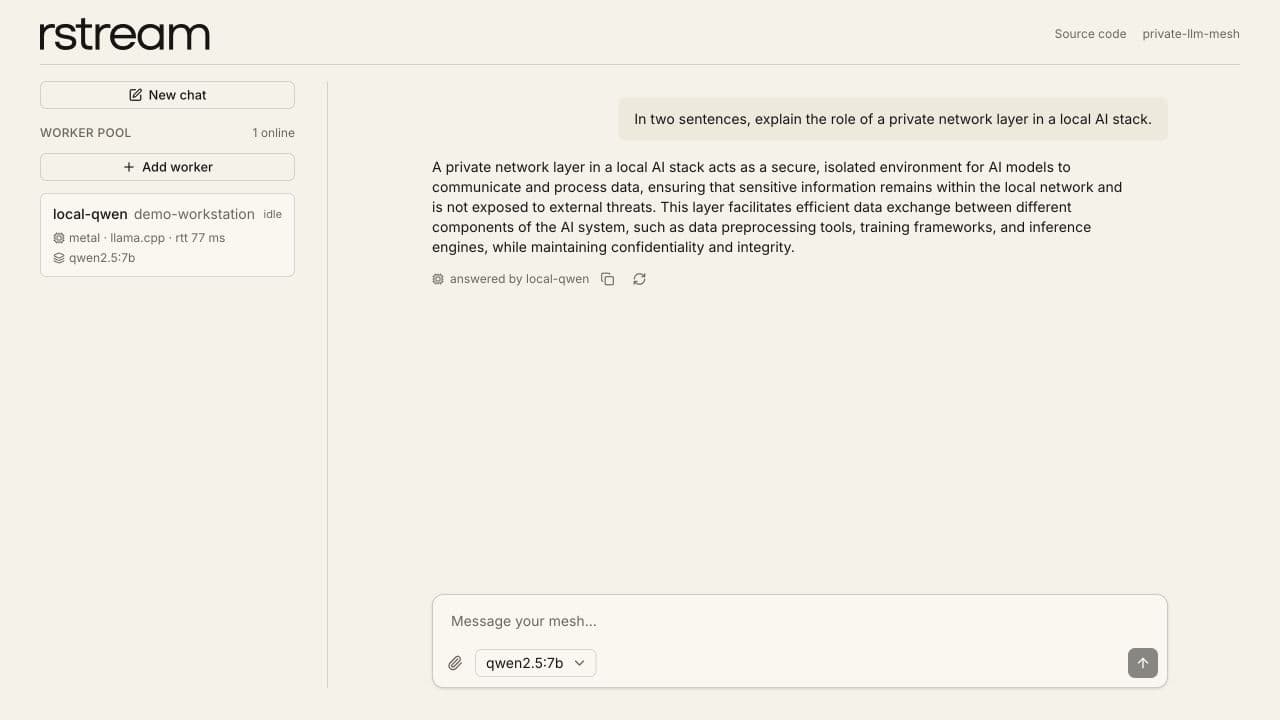
The worker pool and the response remain visible in the same application view.
Every assistant message records the worker that produced it. This makes automatic routing visible without exposing the worker URL or its token to the browser.
The worker URL printed in the terminal is not an unauthenticated model endpoint. A direct request without a token is rejected:
curl https://<worker-host>/v1/modelsThe expected status is 401 Unauthorized. The application can probe /v1/models because it mints a separate short-lived token restricted to the worker pool and the probe paths.
Use the local model as an agent
The same chat route can give the model tools. The sample includes web search and fetch tools, plus the WebTTY tools discovered from the hosted rstream MCP server. Try a read-only request such as:
Use the rstream tools to list the machines I can reach, then summarize the result.The model first chooses a tool, the application executes it on the server, and the result returns to the same worker for the final answer. Tool instructions come from the MCP server rather than being duplicated in the application prompt. Operations marked as destructive require an approval in the interface before they run.
Tool selection depends on the model as much as the application. Qwen3 and Mistral Nemo work for the sample's tool-calling path; smaller or less capable instruct models may answer in prose instead of producing a structured tool call. A model may also answer directly when it already knows enough, so validate the intended model against the actual tool set, with a request that genuinely requires a tool, before relying on it for operational work.
Set TAVILY_API_KEY in .env.local when reliable web search is required. Search and fetch are external tools: using them sends the query or target URL to Tavily, even though model inference remains on the local worker.
Add workers to the pool
A second worker joins by using the same project and discovery labels. It can serve the same model as a replica or advertise another model through --model and --model-id.
./bin/worker \
  --model qwen3:4b \
  --tunnel-name local-qwen-2 \
  --labels accelerator=gpu,host=gpu-server
For automatic routing, the application first removes unreachable workers and workers that do not advertise the selected model. It compares the remaining workers by normalized work: active and waiting requests divided by the number of decoding contexts. An idle remote worker therefore wins over a busy nearby worker; round-trip time breaks ties only when the normalized load is equal.
The application reserves the selected capacity immediately, before the next health sample can reflect the new request. Those process-local leases prevent a burst of concurrent turns from stampeding one replica during the short discovery-cache window. Equal-score randomization spreads requests from independent application instances, while each worker's bounded admission queue remains the fleet-wide overload boundary. The application stays stateless and does not need Redis for this routing policy.
A fresh /v1/models request validates liveness immediately before token minting. If an automatically selected candidate fails that pre-start check, its reservation is released and the next eligible worker is tried. Once the model request has started, the application does not replay the turn: an agent may already have executed a tool, and an automatic retry could duplicate an external side effect. A pinned worker also fails closed instead of silently moving a sensitive task to another machine.
When a worker exits, its control channel and tunnel close. The watch removes it from the browser pool, and new automatic turns use the remaining candidates. Returning workers advertise their model and capacity again without an application restart.
Enable native acceleration
The worker build follows the host. On Apple Silicon it enables Metal and embeds the shaders in the binary, so no extra step is required and the worker stays self-contained. Everywhere else the default is a portable CPU build.
On a Linux host with a supported NVIDIA toolchain, enable CUDA instead:
make build LLAMA_CMAKE_FLAGS="-DGGML_CUDA=ON"Changing the acceleration flags, or the pinned llama.cpp revision, rebuilds the dependency on its own, so there is no make distclean step to remember.
Acceleration is worth the attention because prompt processing dominates the time to first token in an agent turn: the system prompt and the tool schemas alone run to several thousand tokens before the model writes anything. On an Apple Silicon laptop, the same turn that took nearly a minute on the CPU build returns in a few seconds once Metal is used.
Set the accelerator label to match the resulting build. Labels describe the worker to the application; they do not enable hardware acceleration themselves.
Each concurrent llama.cpp context has its own KV cache. Increase --parallel only after accounting for that memory cost. Keep --ctx large enough for the system prompt, tool schemas, tool results, and answer together. The sample defaults to an 8192-token context because a multi-step tool turn can exceed the 4096-token default used by some local runtimes.
Join the same pool with Ollama
The worker-compose variant demonstrates that the pool does not depend on the embedded Go worker. Ollama serves its normal OpenAI-compatible API, while the rstream Docker reconciler creates a tunnel from container labels.
On a Linux Docker host, copy the Compose environment and provide a project agent token and engine address:
cd rstream-examples/private-llm-mesh/worker-compose
cp .env.example .env
docker compose up -d
docker compose exec ollama ollama pull qwen3
The Ollama port remains inside the Docker network. The reconciler watches Docker, publishes the service through rstream with token authentication, and applies the same discovery labels as the standalone worker. The application reads Ollama's /v1/models, so newly pulled models appear without editing the labels or restarting the app.
Ollama does not implement the sample's /healthz response, so the application treats it as a reachable OpenAI-compatible worker with neutral load and uses round-trip time for ordering. Keep PLLM_CTX aligned with the context configured in Ollama; the Compose sample sets both to 8192.
On Apple Silicon, the standalone worker is the useful accelerated path because a Linux Docker container cannot use Metal. The Compose variant is most relevant on Linux, especially when Ollama can use an NVIDIA GPU. The reconciler mounts the Docker socket to observe containers, so treat it as privileged host access and use a restricted socket proxy on hardened systems.
Security and data boundaries
Three credentials serve different purposes in the sample:
- The worker uses its local rstream CLI context, or a provisioned agent token, to create its tunnel. It never receives the application's client secret.
- The application keeps its rstream client ID and secret on the server. For each chat turn it mints a token valid for one worker tunnel and the exact
/v1/chat/completionspath, with a default lifetime of 300 seconds. - The browser receives only a 120-second, read-only token for watching the labeled worker set. It cannot use that token to connect to a model endpoint.
Model weights stay on the worker machine and inference executes there. Chat content originates in the browser, is processed by the Next.js application, and crosses the encrypted rstream tunnel to the worker. Tool calls can also send selected data to the service implementing the tool. These boundaries keep model execution local while allowing the application and its tools to run where the product requires them.
The sample uses one project-wide worker pool. Every user admitted by the application can select from that pool. A multi-tenant product should add tenant labels and tenant-specific token filters, or adopt a per-user worker registration model rather than reusing this global pool unchanged. Labels and Fine-Grained Tokens describe the primitives used for that boundary.
Deploy the application
For a shared deployment, remove AUTH_DISABLED and configure GitHub OAuth with at least one of ALLOWED_EMAILS, ALLOWED_EMAIL_DOMAINS, or ALLOWED_GITHUB_LOGINS. GitHub authentication fails closed when no allowlist is present. The pool, chat, and watch API routes all require the resulting application session.
The application is otherwise stateless and can run on Vercel or another Node.js host. Set the same rstream and authentication variables in the deployment environment. Chat history remains in the browser session, while worker discovery is rebuilt from the rstream registry.
The chat route has a 60-second execution limit in the sample. Large prompts on CPU workers can spend much of that budget processing the system prompt and tool schemas before generating the first token. Use an appropriate deployment limit, reduce the tool surface, or run an accelerated worker when interactive latency matters.
The sample targets hosted rstream projects because it uses application credentials, managed fine-grained tokens, project resolution, and the hosted rstream MCP endpoint. Model execution and worker hardware remain local; rstream supplies the managed connectivity and authorization layer.
Where rstream fits
Local AI runtimes already solve model loading, quantization, GPU offload, and OpenAI-compatible inference. Agent frameworks already solve streaming turns and tool execution. rstream does not replace either layer.
Its role begins when those model servers live on machines that the application cannot or should not reach directly. The outbound tunnel makes each worker reachable without changing the local network, tunnel labels form a lightweight registry, watch events keep the pool current, and scoped tokens let the application delegate only the operation needed for one turn. That makes rstream one composable network layer in a local AI stack, while the model runtime and application remain independently replaceable.
For the underlying product model, continue with HTTP Tunnels, Labels, Signaling, and Fine-Grained Tokens.
For a worker topology, routing policy, model runtime, or authorization model tailored to your product, contact us.
Technical qualification
We exercise the worker pool through the same streaming route used by the interface. Each turn must identify its worker, carry valid text or structured tool output, reach the stream terminator, and contain no error. Local tests cover scheduling, bounded admission, cancellation, concurrent shutdown, and the real model runtime.
The live profile begins with two equivalent workers, removes worker A while traffic continues, then restores it. During the outage, new turns must move to worker B without exposing a broken stream. After recovery, both workers must receive traffic again.
The qualification record retains per-turn attribution and timings. The qualification runner reproduces the worker loss and recovery sequence.
Troubleshooting
If the application sees no eligible worker, compare the requested model and capability labels with the private tunnel inventory. A worker can be online yet deliberately excluded when its model, capacity, or health metadata does not satisfy the routing policy.
If a selected worker fails before first output, inspect model-runtime readiness and the scoped endpoint token separately. During an established stream, cancellation and worker loss must release admission capacity before a retry; otherwise the surviving pool can appear full after the original request has gone away.