Changelog

All the latest updates, improvements, and fixes to rstream.

Agent-native rstream

rstream now exposes the product through agent-readable discovery, authentication, API, and workflow contracts.

This means an agent can start from the public site, discover the API catalog, learn how OAuth authentication works, fetch hosted and engine OpenAPI contracts, load rstream task skills, then act against the product with user-approved access. The intended path covers practical workflows such as selecting or creating a project, configuring the CLI, opening a published HTTP tunnel, setting up WebTTY, reading live engine inventory, and diagnosing setup failures.

The discovery layer is published through standard web entrypoints. The homepage advertises useful resources with Link response headers. /.well-known/api-catalog points to the hosted OpenAPI contract, engine OpenAPI contract, API documentation, and status endpoint. OAuth metadata is available through /.well-known/oauth-authorization-server and /.well-known/oauth-protected-resource. Agent Skills are indexed at /.well-known/agent-skills/index.json, and the MCP Server Card is available at /.well-known/mcp/server-card.json.

The API contracts now separate hosted control-plane operations from engine data-plane operations. /api/openapi.json describes automation-facing hosted APIs, including project creation and project resolution. /api/engine/openapi.json describes the engine endpoints for clients, tunnels, SSE, and WebSocket state. Both contracts expose rstream permission metadata so agents can choose practical scope bundles instead of guessing from endpoint names.

The CLI also gained more automation-friendly output paths and a structured diagnostic command. rstream login -o json, rstream project use -o json, context commands, list commands, events, and forward flows can now be consumed more reliably by agents and CI. rstream doctor -o json, available in rstream CLI 1.14.0 and later, provides a structured readiness check after setup changes or during troubleshooting without printing token values.

For the complete model, see Agent Native, APIs, and CLI Workflow.

Challenge mode

HTTP tunnels can now require a browser challenge before traffic is forwarded upstream.

Challenge mode adds an automated browser verification step at the edge. When a browser reaches a protected HTTP tunnel without a valid challenge session, the engine redirects it to an rstream verification page, runs the challenge, then returns to the original tunnel URL.

The check happens before rstream Auth, so it can reduce unwanted automated traffic before account-based authentication is evaluated. A valid and authorized bearer token remains the machine-client path and can proceed without the browser challenge.

Challenge sessions use a dedicated cookie scoped to the tunnel host. They are independent from rstream Auth sessions, which keeps browser verification and user identity separate even when both controls are enabled on the same tunnel.

Challenge mode is available for HTTP tunnels with rstream forward --http --challenge-mode when the engine has an active challenge backend configured.

For behavior details and setup notes, refer to the Challenge Mode guide.

Stable domains

Published tunnels can now request a stable domain instead of relying only on a generated endpoint.

Each tunnel project owns a domain namespace under its engine host. A tunnel can request a hostname in that namespace, such as api-<project-endpoint>.t.<engine-host>, and the engine validates that the requested value belongs to the same project before accepting it.

This keeps public URLs stable across tunnel recreation when a service has a known identity. It also preserves the existing allocation model: if no hostname is provided, the engine still allocates a standard tunnel endpoint automatically.

The runtime protocol now returns hostname and port separately. The older host value remains available for compatibility, but new clients should use the explicit fields.

The CLI also keeps a generated stable domain during reconnect and reconcile loops when the user did not provide a hostname, reducing URL churn during short disconnects.

Stable domain support in rstream forward, rstream run, and WebTTY flows is available in rstream Go CLI 1.13.0 and later.

For setup details and validation rules, refer to the stable domains guide.

QUIC tunnel transport

QUIC is now available as the transport between an rstream client and the edge.

The published side of the tunnel does not change. A project can still expose HTTP, TLS, DTLS, or QUIC endpoints while the publishing client carries its control channel and upstream traffic over a single QUIC connection instead of TLS over TCP.

This is a better fit for unstable paths, environments where TCP recovery is expensive, and datagram-heavy workloads. DNS override, DNS over TLS, DNSSEC validation, and address-family controls remain available on the transport side.

Transport selection is opt-in and depends on cluster support. Existing workflows can keep the default TLS transport, while CLI contexts and SDK clients can switch to QUIC where it provides better behavior.

CLI context support for QUIC tunnel transport is available in rstream Go CLI 1.12.0 and later.

For transport semantics and configuration examples, refer to Tunnel Transports.

WebTransport and HTTP upgrades

Published HTTP/3 tunnels carry WebTransport, and WebSocket handling spans the full upstream HTTP matrix.

For browser-facing real-time systems, this keeps WebTransport on the standard HTTP tunnel path. Sessions can stay on published HTTP endpoints and keep the HTTP policy model at the edge, including token authentication, rstream Auth, and access policies, instead of moving to raw QUIC endpoints just to obtain streams and datagrams.

WebTransport is available on published HTTP tunnels configured for h3. WebSocket support now covers H1, H2C, and H3 upstreams, with protocol translation handled at the edge between downstream and upstream HTTP versions.

The main operational change here is WebTransport on the HTTP tunnel model. The broader WebSocket compatibility closes gaps for HTTP/2 and HTTP/3 upstream services at the same time.

The related CLI workflows are supported by rstream Go CLI 1.11.0 and later.

For the protocol matrix and setup details, refer to Connection Upgrades.

Encrypted Client Hello policy

Encrypted Client Hello (ECH) is available as a project setting for TLS traffic terminated by the edge.

That makes it possible to hide SNI and ClientHello metadata without rolling separate changes through every application. One project keeps a consistent ECH posture across published endpoints and project-scoped engine surfaces that terminate TLS.

The setting supports preferred and required. preferred uses ECH when the client and DNS path support it, while keeping the standard TLS fallback path available. required rejects non-ECH handshakes and therefore limits the affected terminated surfaces to TLS 1.3 traffic.

ECH depends on valid DNS HTTPS or SVCB publication for the project hostname and on engine-side ECH configuration for the cluster. TLS passthrough remains excluded because the edge does not terminate the handshake. Community Edition deployments do not enforce this policy.

rstream Go CLI 1.12.0 and later includes the transport-side behavior needed for ECH-aware CLI workflows.

For the runtime policy model and transport-side DNS behavior, refer to Access Policies and Tunnel Transports.

Post-quantum TLS policy

Projects can set a post-quantum TLS policy for traffic terminated at the edge.

This gives a project one cryptographic baseline even when tunnels are created by different CLIs, SDKs, or backend services. Instead of expecting every caller to request the same groups, the edge applies that posture centrally.

Two modes are available: preferred and required. preferred prioritizes hybrid post-quantum groups while keeping classical fallback groups available. required accepts only hybrid groups and enforces TLS 1.3 at runtime. An additional option limits selection to the NIST and FIPS-oriented P-256 and P-384 hybrid families.

The setting applies to terminated TLS surfaces for the project, including HTTPS, TLS, and QUIC endpoints. TLS passthrough remains excluded because the edge does not terminate the handshake. Community Edition deployments do not enforce this policy.

For the runtime policy model, refer to Access Policies.

Fine-grained tunnel grants

image

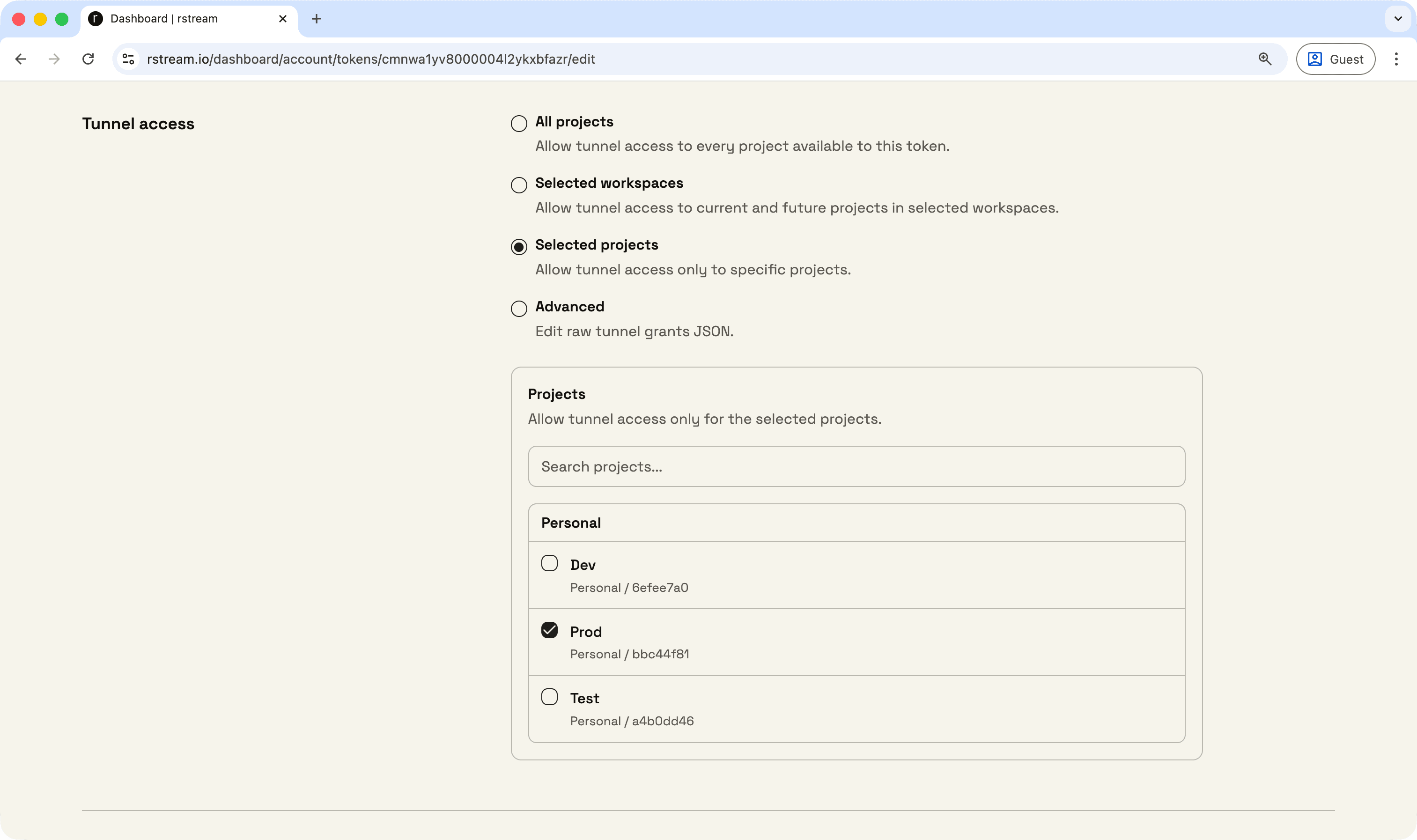
Tunnel access can be restricted directly on credentials and short-lived tokens.

Tunnel grants let a token apply to every tunnel project, selected workspaces, selected projects, or advanced JSON rules. Advanced grants can limit tunnel creation, tunnel discovery, tunnel connections, and HTTP request paths.

This is designed for backend delegation. A backend can keep an application credential, then issue a one-minute token to a remote device that can create HTTP tunnels for one project without receiving account-wide API access or connection rights.

Tunnel grants are available from the Dashboard and API on all managed plans. Operation-level tunnel scopes are available on Pro and Enterprise. Community Edition deployments do not enforce this model.

For the full model and examples, refer to Fine-grained tokens.

Project settings

image

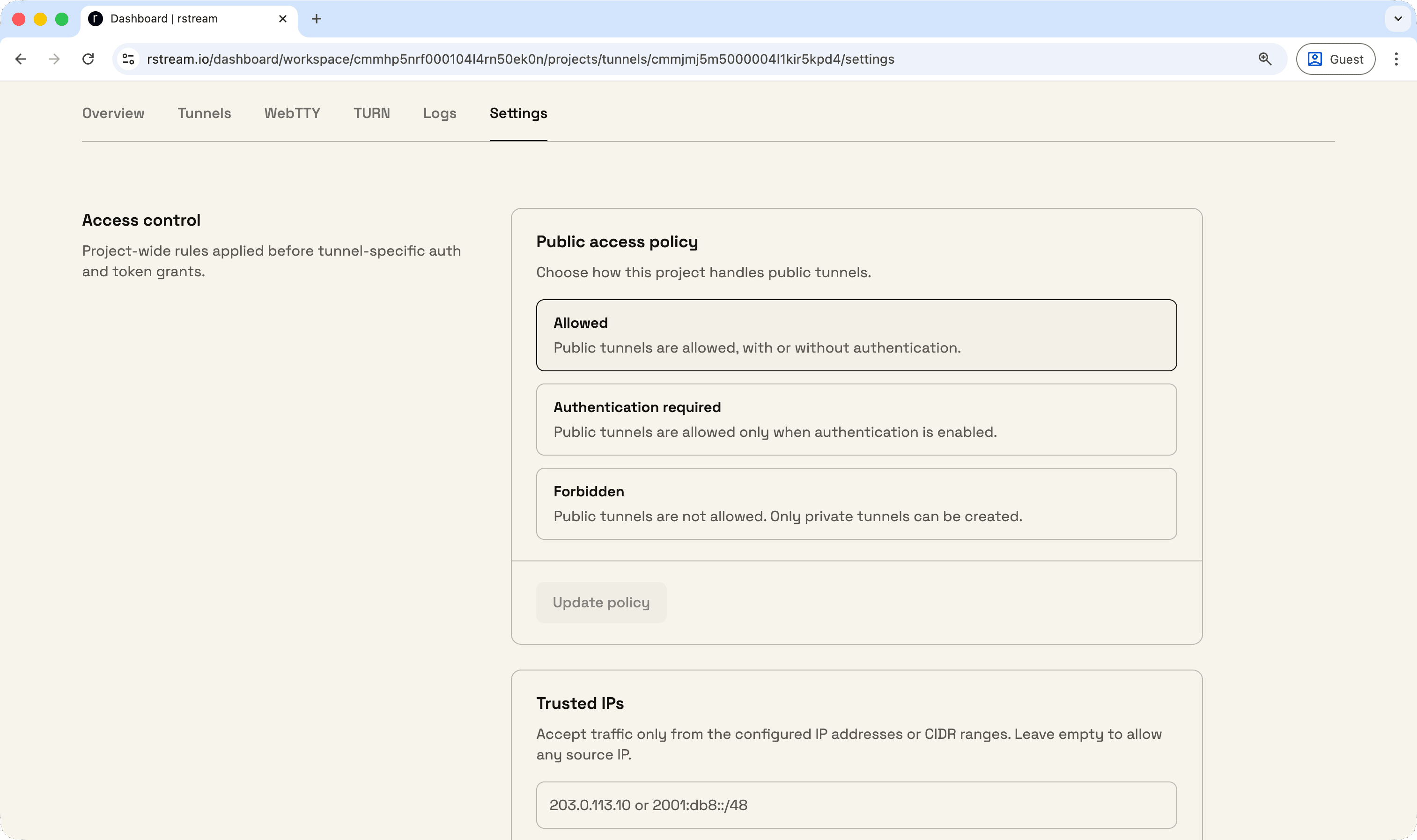
Project-wide settings are available for rstream tunnels.

Project settings add a policy layer above individual tunnel requests, so a project can keep the same access model even when tunnels are created by different credentials, SDKs, or backend services.

Project settings include:

  • public access policy
  • trusted IPs
  • GeoIP restrictions
  • minimum TLS version

Public access can allow public tunnels, require rstream Auth or token auth, or reject public tunnels entirely. Minimum TLS version applies to all published tunnels, whatever the protocol.

Trusted IPs and GeoIP restrictions act as project-level bounds. When a tunnel request also specifies values, the engine keeps only the overlap with the project policy and rejects the tunnel when no overlap exists.

Public access policy and minimum TLS version are available on Basic, Pro, and Enterprise projects. Trusted IPs and GeoIP restrictions require Pro or Enterprise. Project settings are not enforced on Community Edition deployments.

For the access policy model behind these settings, refer to Access Policies.

Managed STUN and TURN

image

Managed STUN and TURN is available directly from rstream tunnels.

If a tunnel project already publishes the signaling API or WebSocket endpoint for a WebRTC application, the same project can issue TURN credentials and use the hosted relay service for ICE fallback. That removes the usual split between publishing signaling and operating a separate STUN/TURN stack.

The hosted service accepts STUN binding requests over UDP and TCP on IPv4 and IPv6. TURN UDP relay allocations are available over UDP, TCP, TLS, and DTLS on IPv4 and IPv6. TURN TCP relay allocations are currently available over TCP and TLS on IPv6.

You can issue TURN credentials through the platform API, through the Go SDK, or through local derivation inside an existing backend.

Managed STUN and TURN is included on hosted plans at no additional cost. Relay usage is metered independently from regular rstream tunnels bandwidth; quota varies by plan. Community Edition deployments do not include managed STUN/TURN.

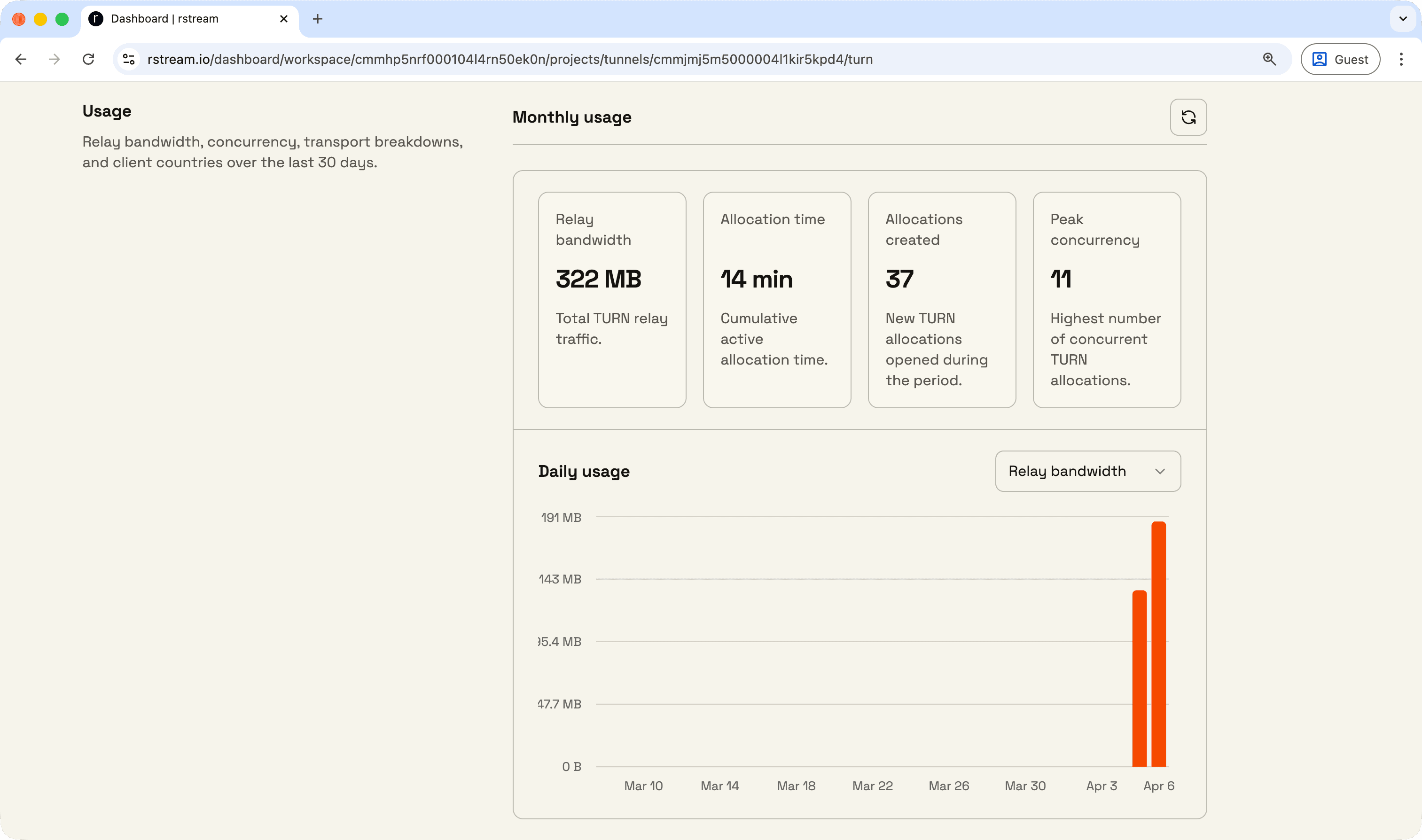
The dashboard now surfaces TURN alongside the existing tunnel views. The project usage page keeps TURN bandwidth separate for the current billing period, and the dedicated TURN page adds connection details, credential issuance, monthly usage, and 30-day operational breakdowns for relay traffic, concurrency, transports, allocation types, address families, and client countries.

For protocol details, issuance flows, hosted limits, and dashboard behavior, refer to STUN and TURN.

rstream UI

image

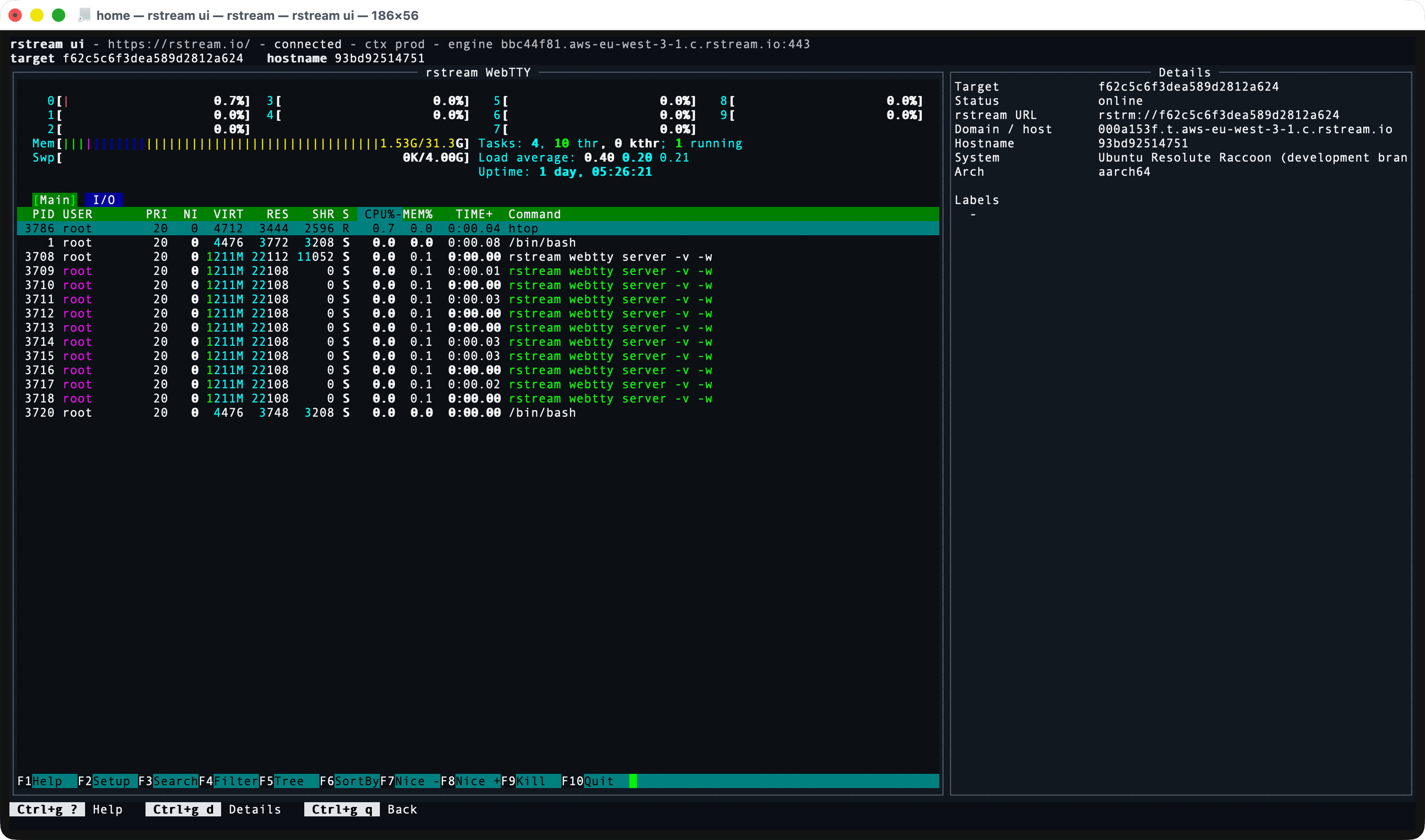
rstream UI adds an interactive operator view to the CLI for live project inventory and WebTTY access. WebTTY servers, tunnels, and clients now appear in a single screen, with live updates streamed from the signaling API.

You can inspect a target, switch between summary and JSON views, and open an embedded WebTTY session without leaving the CLI.

This is the path for sessions where discovery and access happen together. If a machine is only reachable through outbound connectivity, rstream UI removes the context switch between finding the target and opening it. rstream webtty list remains available when plain inventory output is enough.

rstream UI is available in rstream CLI 1.9.0 and later.

For the full remote-access workflow, refer to Access Remote Machines with rstream WebTTY.