Build Adaptive Real-Time Video Streaming with WebRTC and rstream
Build and qualify a device-side real-time video stack that adapts to congestion, repairs packet loss, survives path changes, and publishes its viewer through rstream.
This is the first guide in a three-part series built around one Go video producer. It establishes the direct device-to-browser path; the next guides add a Next.js product control plane and optional MediaMTX fan-out without replacing the media core.
Robots, drones, remote cameras, and field devices share the same media problem: the source must stay private, browser connectivity must survive NAT and network changes, and the encoder must yield before congestion turns live video into stale video. This guide builds that complete device-to-browser path and shows how to qualify its behavior under controlled bandwidth, latency, jitter, and packet loss.
The device runs one Go binary. GStreamer captures and encodes the source, Pion owns WebRTC, and the rstream Go SDK publishes the viewer and WHEP endpoint through an outbound tunnel. Managed STUN/TURN establishes the media path. Trickle ICE and ICE restart handle reachability changes; TWCC/GCC, bounded pacing, NACK/RTX, and optional FlexFEC keep the stream inside the path's current capacity.
The repository is a production-oriented reference implementation. It includes H.264 and AV1 profiles, adaptive bitrate, shared or per-viewer media allocation, session diagnostics, tunnel recovery, product provisioning, static Linux builds, and a reproducible qualification harness. This producer carries the media implementation through the complete series; product control and multi-viewer distribution evolve around it.
Clone the reference implementation:
rstream examples / webrtc-video/producerOpen the standalone WebRTC video producer sample.git clone https://github.com/rstreamlabs/rstream-examples.git
cd rstream-examples/webrtc-video/producerOne media core, three delivery paths
The Go code in webrtc-video/producer is the stable device-side boundary throughout the video series. Capture, encoding, congestion control, pacing, repair, recovery, and OpenMetrics stay in that process. The later guides change who provisions it and how an encoded stream reaches viewers.
1. Adaptive producer — this guide — Go producer ⇄ browser over WebRTC
One producer serves one browser. rstream publishes WHEP and supplies managed STUN/TURN; ICE uses a direct media path when available and a TURN relay when required. This is the reference path for qualifying the device-side media loop.
2. Product control with Next.js — Next.js provisions → Go producer ⇄ browser
The same producer runs in provisioning mode. Next.js owns device identity, short-lived rstream material, viewer authorization, and live fleet state. WHEP and media continue between the browser and producer, preserving the one-to-one WebRTC path and its adaptive behavior.
3. On-demand MediaMTX fan-out — Go producer ⇄ MediaMTX ⇄ browsers
An on-demand adapter pulls one strict WHEP source from this producer, repairs the shared upstream, and publishes it to MediaMTX. The Next.js control plane selects the direct or fan-out backend while the producer and browser player remain unchanged. Native MediaMTX WHEP pull is also qualified through an explicit compatibility profile with a narrower protection set.
This boundary matters operationally. In direct mode, browser feedback drives the producer. In fan-out mode, the adapter drives feedback and repair on the shared device upstream; MediaMTX and each browser establish a separate downstream control loop. Producer OpenMetrics therefore describe the device uplink in both architectures; MediaMTX and browser telemetry describe viewer delivery. Separate measurements on both legs show precisely where quality changes.
This guide focuses on the standalone shape and the complete media path: a one-to-one device-to-browser WebRTC session, publication through an rstream HTTP tunnel, managed STUN/TURN, Trickle ICE and ICE restart, packet recovery, adaptive bitrate, and static Linux delivery.
From media pipeline to product-controlled session
rstream supports two complementary paths for live video. Both use the same private network; the difference is where the application wants the media and session policy to live.
The GStreamer and FFmpeg guides connect existing media tools through rstream nc. Capture, encoding, muxing, buffering, recovery, and playback remain part of the media pipeline, while rstream supplies the private connection. This compact model fits operator workflows, trusted point-to-point streams, RTSP gateways, and applications whose media framework already owns adaptation.
A browser-facing product usually owns more of the session: WHEP authorization, short-lived TURN credentials, ICE recovery, congestion feedback, packet repair, lifecycle, and user-visible health. The Go SDK brings tunnel state and WebRTC feedback into the same process as the encoder policy. The application can then distinguish current video from repair traffic, expire obsolete work, and keep its latency budget consistent as the network changes.
The CLI path stays simple and composable. The SDK path gives product code direct control over the media loop. They can coexist in the same deployment.
Prepare the project and local context
Before running the sample, install the rstream CLI, create an account, create a project, and select that project locally. The installation and login details are covered in Installation, CLI Login, and CLI Workflow. Once the project exists, select it locally with this setup.
rstream login
rstream project use <project-endpoint>
The sample reads the active rstream context from the local machine. That context is used both to publish the tunnel and to obtain the TURN material required by the WebRTC path.
For local development, the machine also needs Go 1.27+, Node.js 20+, pkg-config, and a GStreamer installation that includes the elements required by the selected pipeline. The sample README includes the package-level setup for macOS and Ubuntu/Debian.
Direct device-to-browser path
The device-side process keeps the browser-facing surface on one origin. Its local HTTP server serves the viewer, WHEP resources, TURN bootstrap, and status endpoints. GStreamer produces H.264 or AV1 access units, and Pion sends them over WebRTC. rstream publishes the HTTP server through one public URL.
The library choices follow the same logic. Pion is the reference WebRTC implementation in the Go ecosystem. It exposes the transport feedback, interceptor model, and media primitives needed for a device-side streamer. GStreamer covers capture, conversion, and encoding while keeping the source graph configurable as a pipeline string.
The Linux build uses gstreamer-full, static linking, cgo, and musl to package the application as a standalone binary. Development retains flexible GStreamer pipelines; deployment receives one self-contained application binary.
The page loads from the tunnel URL, creates its WHEP resource on the same origin, asks the device process for TURN credentials, and receives media from that process. The device runs one binary for capture, WHEP session control, and tunnel publication. Its optional metrics listener is deliberately separate from the published application listener.
Use the Go SDK
The device process reads the active local rstream context, opens a published HTTP tunnel with the Go SDK, and serves its local HTTP handler through that tunnel. The tunnel implements the standard Go listener interface, so the local and public paths use the same HTTP server.
client, err := newRstreamClient(opts, cfg.Tunnel.Transport)
if err != nil {
	return nil, err
}
control, err := client.Connect(ctx, nil)
if err != nil {
	return nil, fmt.Errorf("connect to rstream tunnel engine: %w", err)
}
auth := cfg.Tunnel.Auth
name := strings.TrimSpace(cfg.Tunnel.Name)
properties := rstream.TunnelProperties{
	Name:        rstream.StringPtr(name),
	Publish:     rstream.BoolPtr(true),
	Protocol:    rstream.ProtocolPtr(rstream.ProtocolHTTP),
	HTTPVersion: rstream.HTTPVersionPtr(rstream.HTTP1_1),
}
if auth.Token {
	properties.TokenAuth = rstream.BoolPtr(true)
}
if auth.Rstream {
	properties.RstreamAuth = rstream.BoolPtr(true)
}
rawTunnel, err := control.CreateTunnel(ctx, properties)
if err != nil {
	_ = control.Close()
	return nil, fmt.Errorf("create published HTTP tunnel: %w", err)
}
mode: auto controls the tunnel transport between the producer and the rstream engine. It prefers QUIC and falls back to TLS while opening the producer control channel, then keeps the selected transport for the lifetime of that client. Environment variables take precedence over the YAML profile. The public service remains an HTTP tunnel for the viewer, WHEP resources, and small API surface served by the Go process.
Once the tunnel is open, the public side still behaves like a regular listener. That keeps the HTTP serving code idiomatic and easy to reuse with the rest of the Go standard library.
func (m *Manager) Listener() net.Listener {
	return m.tunnel
}

server := &http.Server{Handler: handler}
serverErrors := serveHTTP(server, tunnelManager.Listener())
On the TURN side, the device asks rstream-go for credentials and passes them to Pion as ICE servers.
credentials, err := rsconfig.CreateTURNCredentialsFromEnv(ctx, p.options)
if err != nil {
	return nil, err
}
configuration := ICEConfig(credentials)
The same project context drives both pieces. The device uses it to publish the viewer and to obtain TURN credentials for the WebRTC path, which keeps the first version deployable as a single device-side process. When the local context already contains the routing data for the project, the SDK derives TURN credentials directly from that context. Otherwise it falls back to the Control plane API. In both cases, the device keeps control of the TURN bootstrap path and the browser still talks directly to the device process during session setup.
More background on the managed TURN side is covered in STUN and TURN. The tunnel publication model is covered in HTTP Tunnels.
Run the reference path
config.h264.yaml is the reference profile. It uses a test pattern source, H.264, the default recovery path, and a fixed encoder bitrate. The shortest way to run it is the following command.
make runThe manual flow builds the device binary first, then starts it with the reference profile.
make build
./webrtc-video-producer -config ./config.h264.yaml
With an active local rstream context, that is enough to bring the full stack online. The process starts locally and prints both the local URL and the public URL.
info  Local URL: http://127.0.0.1:8080
info  Public URL: https://xxxxxxxx.t.<cluster-domain>
Open the public URL and wait for the sample status to load, then select an ICE policy and click Start streaming. The browser creates a WHEP resource on the tunnel origin, obtains TURN credentials from the device process, trickles ICE candidates over HTTP, and attaches the remote video track. A working session shows Peer: connected, ICE: connected or completed, and Playback: Playing.
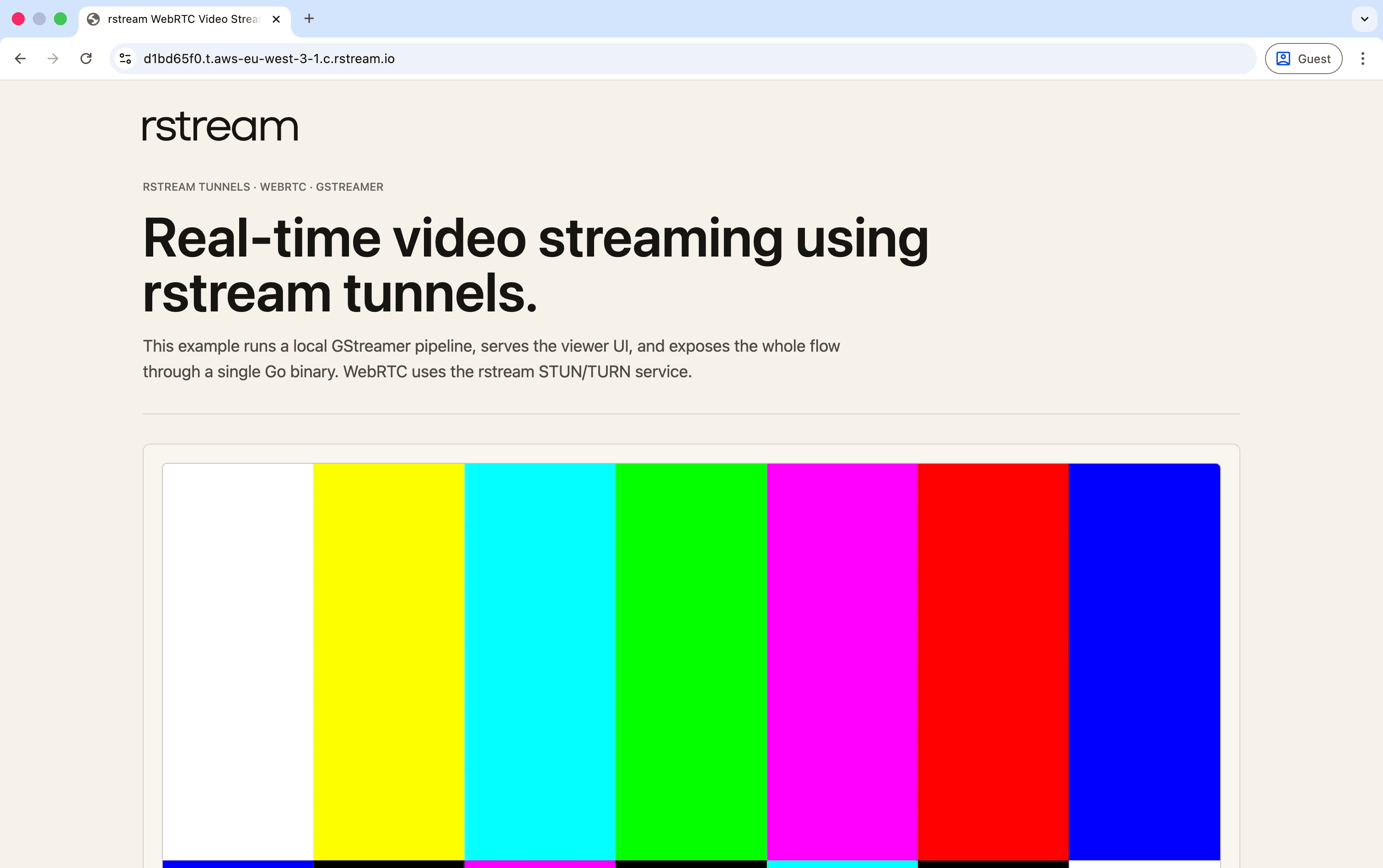
The standalone sample serves the viewer and WHEP endpoint from the device process, then exposes both through one rstream tunnel URL.
For a local-only run, use the following command.
make run-localThat disables publication and serves the viewer on http://127.0.0.1:8080.
Reference profiles
The repository ships several profiles that cover the main capture, codec, and recovery combinations.
| Profile | Source | Codec | Adaptive bitrate | Best used for |
|---|---|---|---|---|
config.h264.yaml | videotestsrc | H.264 | Off | Reference path and first validation |
config.av1.yaml | videotestsrc | AV1 | Off | Codec negotiation and AV1 transport testing |
config.provisioning.h264.yaml | videotestsrc | H.264 | On | Product API provisioning in the next guide |
config.test-pattern.h264.twcc-gcc.yaml | videotestsrc | H.264 | On | Repeatable NACK/RTX qualification |
config.test-pattern.h264.twcc-gcc-flexfec.yaml | videotestsrc | H.264 | On | Loss-resilient qualification with FlexFEC |
config.macos-webcam.h264.yaml | avfvideosrc | H.264 | Off | macOS webcam with fixed bitrate |
config.macos-webcam.h264.twcc-gcc.yaml | avfvideosrc | H.264 | On | macOS webcam with adaptive bitrate |
config.macos-webcam.av1.yaml | avfvideosrc | AV1 | Off | macOS AV1 evaluation |
config.macos-webcam.av1.twcc-gcc.yaml | avfvideosrc | AV1 | On | macOS AV1 plus adaptive bitrate |
config.raspberry-pi-camera.h264.yaml | libcamerasrc | H.264 | Off | Raspberry Pi camera with fixed bitrate |
config.raspberry-pi-camera.h264.twcc-gcc.yaml | libcamerasrc | H.264 | On | Raspberry Pi camera with adaptive bitrate |
config.raspberry-pi-camera.av1.yaml | libcamerasrc | AV1 | Off | Raspberry Pi AV1 evaluation |
config.raspberry-pi-camera.av1.twcc-gcc.yaml | libcamerasrc | AV1 | On | Raspberry Pi AV1 plus adaptive bitrate |
H.264 is the default because it is the most predictable path for low-latency live capture across browsers and devices. AV1 is an additional profile to benchmark on the target hardware.
Tunnel authentication
The sample configures tunnel authentication with two explicit flags. If both are false, the tunnel is public. If token is true, the tunnel requires a valid rstream tunnel token. If rstream is true, rstream identity auth is enforced at the edge. The two flags are product policy, not WebRTC policy, and the decision is enforced on the tunnel before the request reaches the device process.
tunnel:
  auth:
    token: false
    rstream: false
The standalone sample logs the published URL returned by rstream and leaves viewer token distribution to a trusted surface. Long-lived device credentials remain outside browser-visible URLs.
For quick validation in a controlled environment, keep both flags false. For operator-facing workflows, rstream auth is usually the cleanest standalone option. For product-facing access where one backend issues short-lived producer and viewer tokens, use the provisioning mode covered in the next guide.
The broader authentication model is covered in Authentication and HTTP tunnel authentication.
Add feedback and packet repair
The sample enables the first useful layer of transport hardening by default. That matters on remote devices where the uplink may move between Wi-Fi, 4G, and 5G, where the radio environment may change during a session, or where the available bandwidth can collapse without warning.
TWCC gives the sender a transport-wide congestion signal. NACK lets the browser report packet loss. RTX provides the retransmission path. The reference scheduler serves repair traffic promptly, protects current video from starvation, and expires a queued repair after 225 ms. That deadline keeps the repair useful to playback instead of converting packet loss into additional latency.
FlexFEC remains opt-in because it reserves capacity before a loss occurs. The loss-resilient reference emits one proactive repair packet per five media packets and includes that 20% overhead in the sender's wire-rate budget. A separate stress profile uses two repair packets per four media packets. Production deployments should measure the trade-off on their own path; links that recover cleanly through NACK and RTX can leave FlexFEC disabled.
Primary and RTX packets receive their transport-wide sequence number at actual pacer egress. The congestion controller therefore sees the order placed on the wire rather than the scheduler's internal priority decisions. This is the level of control exposed by the Go integration: the sender knows both the feedback semantics and the role and age of every queued packet.
The viewer page exposes the signals that matter while you test.
- negotiated codec
- active recovery path
- current auth mode
- current TWCC target
- current encoder target
- runtime log for tunnel, WHEP, ICE, and playback events
These signals make the main transport and media transitions visible from the sample UI. Browser WebRTC diagnostics remain useful for lower-level investigation.
Keep the link resilient
The important design detail is that this sample treats session control and media as two different planes. WHEP resource operations use the HTTP surface published through the rstream tunnel. The media plane is the WebRTC path negotiated by ICE. Each plane has its own bounded lifecycle and recovery policy.
On the WHEP side, the producer prefers QUIC as its tunnel transport to the rstream engine and retains TLS as a fallback.
tunnel:
  transport:
    mode: auto
The public browser entrypoint remains a standard HTTP tunnel. The browser creates a WHEP resource with POST, sends Trickle ICE fragments with conditional PATCH, and releases the resource with DELETE. The transport setting applies only between the producer and the rstream engine. If that connection breaks, the tunnel loop republishes the HTTP service; the player's bounded reconnect obtains fresh authorization before creating another resource.
On the media side, ICE gathers local, server-reflexive, and relay candidates, forms candidate pairs, runs connectivity checks, and selects a viable media path. Trickle ICE sends candidates as they appear, so WHEP resource setup can progress while gathering continues.
The browser and device exchange candidates through WHEP SDP fragments. Strong resource ETags serialize updates, request bodies and PATCH cadence are bounded, candidates from obsolete sessions are discarded, and an ICE restart rotates both ICE credentials and the resource ETag. The complete browser and producer implementations remain visible in whep-client.ts, whep.go, and broadcaster.go.
After connection, ICE continues validating the selected pair. When that path fails while the WHEP resource remains reachable, the browser first attempts an in-place ICE restart. Fresh ICE credentials and candidates let both peers select another path while the media session stays active. Two failed restarts trigger a complete, bounded session reconnect; a stable 30-second session resets that retry budget.
The result is a recovery model with separate responsibilities. Automatic tunnel transport selection uses QUIC when it is reachable and TLS otherwise; the tunnel loop republishes the WHEP service if that connection is lost. Trickle ICE exchanges candidates incrementally. ICE restart renegotiates the media path when the selected candidate pair no longer works. TURN provides a relay when a direct path cannot be established.
ICE and TURN maintain reachability, while TWCC, GCC, NACK, RTX, and the encoder control loop react to changing path quality. Trickle ICE and adaptive bitrate solve different parts of the same runtime problem: selecting a viable media path and keeping the stream within that path's capacity.
Adaptive bitrate
Once congestion feedback is in place, the next step is to let the encoder react to it. The sample includes an adaptive bitrate backend named twcc-gcc. The transport estimate comes from the standard Pion TWCC and GCC path. The application layer then applies bounded bitrate updates to the active encoder in GStreamer.
The standard Pion WebRTC estimator remains the source of truth. A small application policy keeps the transport budget, encoder, pacer, and product quality floor consistent. Material decreases apply immediately, callback bursts coalesce to the newest estimate, and loss blocks increases for five seconds. Once the hold clears, the encoder follows GCC's current bounded target; adding a second application-side ramp would starve the estimator of the traffic it needs to confirm recovered capacity.
The first bitrate increase after a measured-loss hold also requests one coalesced recovery key frame. The browser reaches a fresh decodable image sooner, while ordinary healthy-link ramp steps remain free of additional key-frame bursts.
The reference pacer also prevents the encoder and transport from forming two independent queues. It drains normal encoded-frame bursts with 1.5x headroom and bounds admission to 225 ms of sustained-rate backlog. When a new access unit exceeds that budget, the sender rejects the complete frame before RTP packetization and resumes from a new key frame once capacity returns. This preserves a current, decodable stream instead of accumulating stale video.
The current backend keeps the capture profile, frame size, and frame rate stable while it changes encoder bitrate. This produces one measurable feedback loop per encoder, which means either
media.mode: per-viewer- or
webrtc.maxViewers: 1
The bitrate controller is enabled from the WebRTC section of the configuration.
webrtc:
  maxViewers: 1
  initialBitrateKbps: 5000
  adaptive:
    enabled: true
    backend: twcc-gcc
    twccGCC:
      minBitrateKbps: 2000
      maxBitrateKbps: 8000
      updateInterval: 2s
      changeThresholdPct: 10
      decreaseThresholdPct: 0
      maxIncreaseLossPct: 1
      increaseHoldAfterLoss: 5s
The 1080p30 H.264 qualification profile starts at 5 Mbps and lets the encoder move inside a 2–8 Mbps range. The 2 Mbps floor protects image quality at fixed resolution. Products that span a wider capacity range can place a measured source ladder above the same control loop, reducing frame size, frame rate, or capture profile when the floor is reached.
Observe the producer
The producer can expose its device-side media signals in OpenMetrics format. The exporter covers the source and encoder once, then aggregates the active WebRTC sessions without placing viewer or session identifiers in metric labels.
metrics:
  enabled: true
  listen: 127.0.0.1:9090
The listener is disabled by default and remains separate from the HTTP application published through rstream. A local vmagent or another collector can scrape http://127.0.0.1:9090/metrics and forward the series to the deployment's metrics store. Bind a private interface only when a remote collector is an intentional part of the device network. Add producer and deployment identity as fixed scrape-target labels; viewer and session ids stay out of the producer's metric dimensions.
The exporter separates the TWCC media estimate and encoder media target from the pacer's sustained wire budget and short-burst allowance. It also reports encoded-media and paced-RTP throughput, frame cadence, source freshness, measured loss and delay, queue depth and residence time, adaptive updates, key-frame recovery, NACK/RTX, and FlexFEC. These queries provide a useful first view.
# Encoder media output
rate(rstream_video_producer_encoded_bytes_total[1m]) * 8 / 1e6

# RTP written to the network, including RTX and FlexFEC
sum(rate(rstream_video_producer_pacer_sent_bytes_total[1m])) * 8 / 1e6

# Encoded frames per second
sum(rate(rstream_video_producer_encoded_frames_total[1m]))

# Capture staleness in seconds
time() - rstream_video_producer_last_encoded_frame_timestamp_seconds

# RTT used to suppress repeated RTX requests for a packet already sent
rstream_video_producer_pacer_maximum_retransmission_round_trip_time_seconds

# Duplicate RTX work avoided before it consumes wire capacity
sum(rate(rstream_video_producer_pacer_repair_discarded_packets_total{repair="rtx",reason=~"coalesced|suppressed"}[1m]))
The difference between encoded-media and paced-RTP throughput makes repair overhead visible. Frame rate and source freshness distinguish a network problem from a capture or encoder stall, while TWCC, queue, and loss series show whether the sender is yielding before delay accumulates. The RTT-derived retry window and suppression counter show whether repeated browser NACKs are creating useful repair or merely asking for a packet that is already in flight.
Exercise the control loop under congestion
Validate the adaptive path on the interface that carries the device's media traffic. Browser throttling remains useful for page behavior; interface shaping exercises the actual uplink control loop.
On Linux, tc netem is the right baseline.
sudo tc qdisc add dev wlan0 root netem delay 80ms 20ms loss 3% rate 2mbitTo tighten the path further, use the following command.
sudo tc qdisc change dev wlan0 root netem delay 160ms 40ms loss 6% rate 1mbitTo remove the shaping, use the following command.
sudo tc qdisc del dev wlan0 root netemThe expected pattern is straightforward. TWCC target moves first as the transport estimate reacts to the new path. Encoder target follows within the configured update interval and within the configured rate-of-change bounds. If TWCC target is moving and the encoder target is flat, the application policy is the first thing to inspect. If both values move but the stream still behaves poorly, the encoder and source settings are the next place to inspect.
One control loop, several time scales
The reference combines mechanisms that act at different timescales. Each one protects a distinct part of the session.
- ICE and TURN establish reachability. ICE selects a viable direct path and retains TURN for networks where NAT or policy requires a relay.
- TWCC and GCC estimate capacity. Fresh receiver feedback drives the wire budget across Wi-Fi, Ethernet, and cellular links.
- The encoder yields before latency grows. Urgent reductions take effect immediately; recovery increases remain bounded and progressive.
- The pacer bounds local delay. Normal frame bursts are smoothed and over-budget access units are rejected before packetization.
- NACK and RTX repair recent loss. Repair receives bounded priority while it can still improve playback.
- FlexFEC protects selected links proactively. Part of the available capacity becomes repair traffic when measured loss and RTT justify it.
- ICE restart repairs path failure. The application can select a new candidate pair while preserving the product session.
The in-process Go model coordinates tunnel state, WebRTC feedback, encoder policy, repair age, and user-visible diagnostics. A netcat pipeline continues to expose rstream's reliable and datagram transports to media frameworks that already provide the corresponding control loop.
AV1
The repository includes AV1 profiles for evaluating a more efficient codec without changing the transport architecture. H.264 remains the reference path.
AV1 live capture depends more heavily on the target machine and encoder path than H.264. The opt-in profile measures whether the selected encoder, source, and hardware can sustain the deployment's latency and smoothness envelope.
Use H.264 for the first validation. Treat AV1 as a profile to benchmark on the target device and browsers.
Package the code for Linux devices
Local development is straightforward.
make build
make test
The deployment path that matters for real devices is the Linux distribution build.
make dist-linux-amd64
make dist-linux-arm64
make dist
Those targets build a standalone Linux executable linked against a static gstreamer-full toolchain. The build compiles the GStreamer subset required by the sample, including the codec, parser, and appsink path used by the shipped profiles, and links the Go binary against that toolchain with musl.
The operational result is simple. Copy the binary and its config file to the target machine and run it there. That is the useful shape for Raspberry Pi deployments, embedded systems, and remote devices that do not have a full development stack installed.
The static GStreamer toolchain is defined in build-gstreamer-static-linux.sh. If the pipeline changes, the build script must change with it. Any new source element, encoder, parser, or plugin family introduced by the deployment has to be reflected in that script, otherwise the local development setup and the distribution build will drift apart.
Evolve the distribution layer
The standalone shape keeps validation and deployment compact. Build a Next.js WebRTC Video Platform with rstream uses the same producer in remote-provisioning mode and moves device inventory, credential issuance, viewer authorization, and live tunnel state into a product backend.
The third guide extends that platform with an optional MediaMTX fan-out tier. The direct path keeps the shortest one-to-one route; the media-server path bounds device uplink usage while viewers scale independently. Both use the producer and WHEP player developed here.
For a streaming profile tailored to a camera, codec, hardware target, network envelope, or product control plane, contact us.
Technical qualification
We run a 1920×1080 stream over one controlled media link. Linux traffic control reduces available capacity to 4 Mbit/s, adds delay, jitter, and packet loss, then restores the link. WHEP signaling remains outside the shaped path while sender and browser measurements share the same timeline.
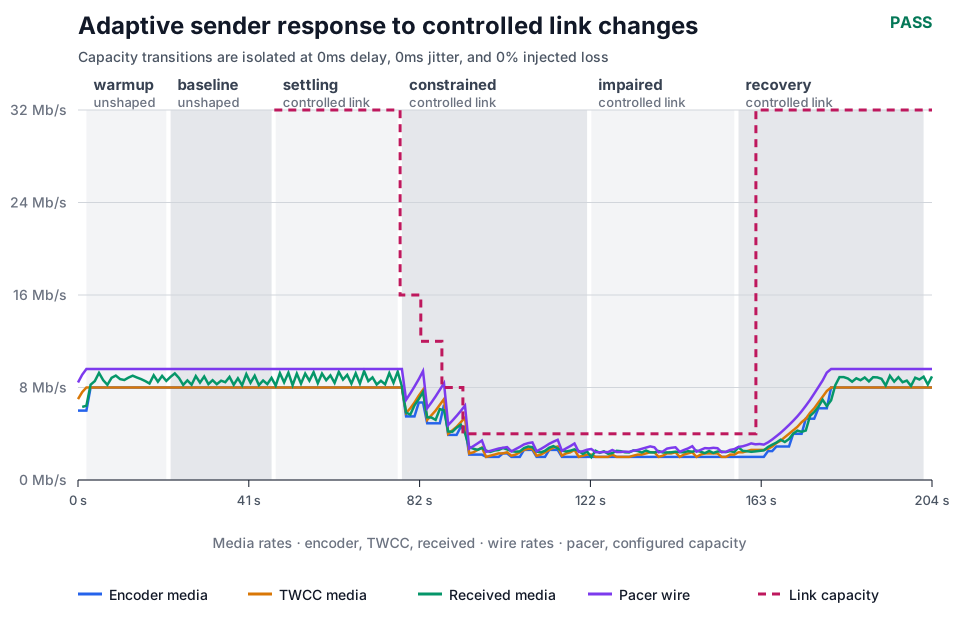
The encoder reacts after the link changes; received media follows without exceeding the constrained path.
Packet loss is injected after bitrate adaptation has settled. NACK requests must produce received RTX packets during that phase without malformed feedback or an unbounded sender queue.
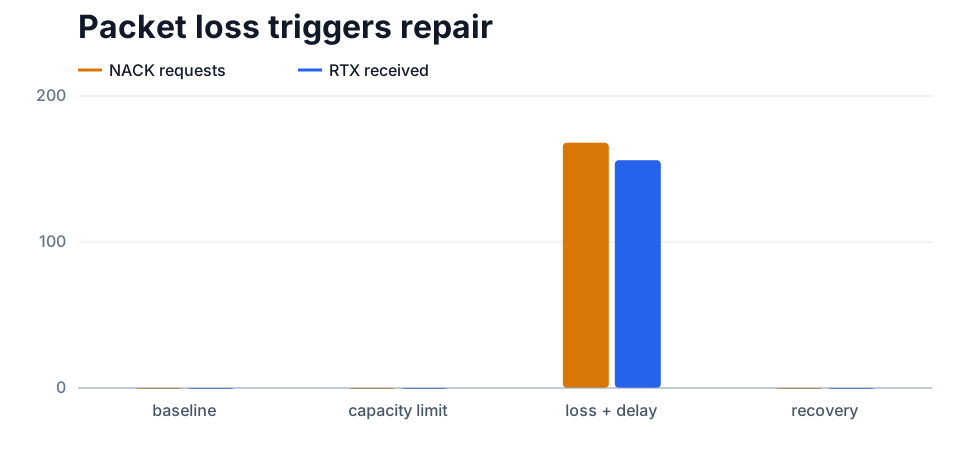
Repair activity appears when loss is introduced and clears after recovery.
The browser must preserve 1920×1080 output, remain above 25 fps on healthy phases and 20 fps under impairment, and keep frozen time below 2% and 10% respectively.
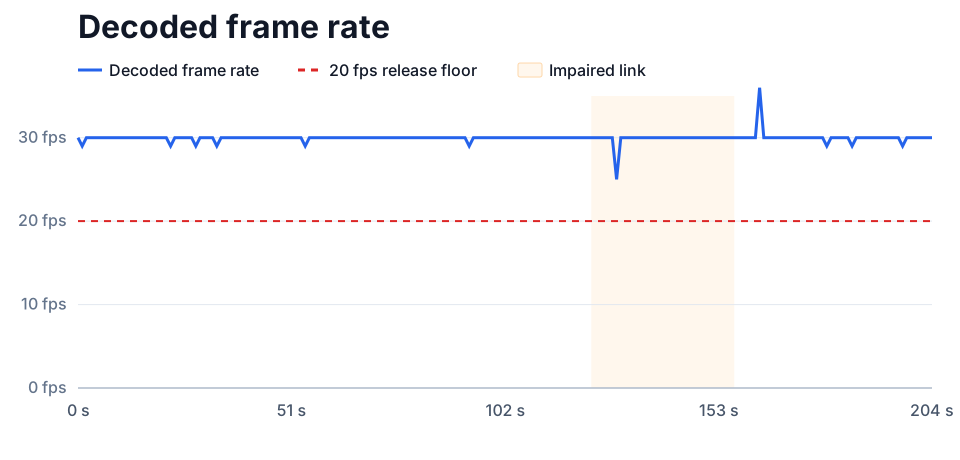
Browser frame rate remains above the release floor while the link is impaired.
The same test runs over direct and TURN-relayed paths. Frame cadence, quantization, RTT, buffers, NACK, RTX, and FlexFEC counters remain in the evidence record; the comparison below isolates the visible effect of packet protection.
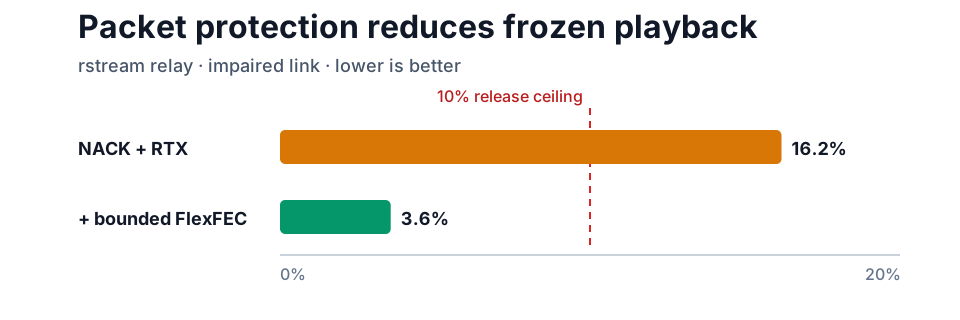
Bounded FlexFEC reduces frozen time on the impaired relay path; the red line marks the release ceiling.
Separate tests cover WHEP resource lifecycle, bounded Trickle ICE, conditional updates, rollback, redirects, cleanup, and an ICE restart after the producer changes network. The qualification record retains the complete measurements and thresholds; the adaptive-streaming runner reproduces the method.
Troubleshooting
If the page loads without video, inspect the WHEP response before changing the media pipeline. A failed POST points to authorization or producer state; a successful resource with no selected ICE pair points to reachability or TURN. If video starts but becomes stale, compare capture freshness, encoder output, pacer queues, and browser frames in that order to locate the first stalled boundary.
Adaptive mode also requires a supported encoder and TWCC feedback. The producer status and OpenMetrics endpoint expose both explicitly; a fixed encoder target with no feedback is a configuration or negotiation issue, not a congestion-control result.