Build a Next.js WebRTC Video Platform with rstream
Add product provisioning, authorization, and live fleet state around the adaptive Go video producer while keeping Next.js deployable on serverless platforms.
This is the second guide in the adaptive video series. The first guide built and qualified the direct device-to-browser path. Its Go producer captures and encodes video, controls congestion and repair, serves WHEP, publishes itself through an rstream tunnel, and exposes producer-side OpenMetrics.
This guide builds the same source tree in provisioning mode and moves product responsibilities into a Next.js application. The device receives its short-lived rstream material from your product API through a device secret. Next.js owns device inventory, user authentication, producer provisioning, TURN issuance, viewer authorization, and real-time tunnel state; both guides build the same media implementation.
The result is a serverless-friendly WebRTC architecture for Next.js. Next.js manages the product backend. rstream tunnels carry WHEP resource requests to the remote device; the rstream APIs issue short-lived access and TURN material and expose tunnel state to the dashboard. The producer tunnel selects QUIC or TLS between the device and the engine. The provisioning profile keeps the media behavior qualified in the first guide: Trickle ICE, managed STUN/TURN, adaptive TWCC/GCC, bounded pacing, NACK/RTX, and one-per-five FlexFEC protection.
Clone the platform reference implementation:
rstream examples / webrtc-video/platformOpen the Next.js platform sample.git clone https://github.com/rstreamlabs/rstream-examples.git
cd rstream-examples/webrtc-video/platformOne media core across the video series
The series has one media core and three delivery paths.
1. Adaptive producer — Go producer ⇄ browser over WebRTC
The first guide qualifies the one-to-one media path with local rstream context. It remains the direct deployment and diagnostic reference.
2. Product control with Next.js — this guide — Next.js provisions → Go producer ⇄ browser
The same Go producer runs in remote-provisioning mode. Next.js adds device identity, short-lived rstream material, viewer authorization, and fleet state around it. Capture, encoding, adaptive control, pacing, repair, recovery, and OpenMetrics remain in the producer.
3. On-demand MediaMTX fan-out — Next.js controls → Go producer ⇄ MediaMTX ⇄ browsers
The platform selects a distribution backend without changing its producer or player. The full profile starts one adapter on demand, pulls one strict producer WHEP resource, repairs that source leg, and publishes it to MediaMTX for fan-out. The direct path remains available for the shortest one-to-one route and diagnosis.
The sample uses Next.js App Router, NextAuth with GitHub OAuth, Prisma with PostgreSQL, @rstreamlabs/tunnels for server-side Engine operations, @rstreamlabs/rstream for shared SDK contracts and schemas, @rstreamlabs/react for live tunnel state in the dashboard, and small shadcn-style UI primitives. The application lets a signed-in user create a video device, copy a one-time device secret, run the producer in provisioning mode, see whether the device tunnel is online, and open the stream from the product UI.
The sample is a reference integration, not a full device-management product. It includes product-owned device secrets, short-lived producer and viewer tokens, TURN credentials issued by the backend, resources.tunnels boundaries, and a real-time tunnel watch instead of database polling for online state.
Product and media boundaries
The architecture now has two independent paths.
Control — device, browser, and optional distributor → Next.js → rstream API
Next.js authenticates the product user or device, issues narrowly scoped material, and follows tunnel state.
Media — Go producer ⇄ browser over WebRTC
Trickle ICE, ICE restart, TURN relay fallback, NACK/RTX, congestion feedback, bounded pacing, and adaptive bitrate remain in the producer developed in the first guide. rstream carries WHEP resource requests and supplies STUN/TURN, while the WebRTC media path stays between the producer and browser.
The MediaMTX path preserves this control plane and changes only the selected distribution backend. Capture, congestion control, repair, recovery, and producer observability stay in the Go process.
Fan-out creates two congestion domains. The adapter terminates repair on the producer's shared upstream; MediaMTX and each viewer establish independent downstream feedback. Producer OpenMetrics describe the device uplink, while MediaMTX and browser telemetry describe viewer delivery. Separating those legs makes a source failure, a distribution failure, and a weak viewer path distinguishable.
The platform owns the product model. PostgreSQL stores users and devices. GitHub OAuth identifies the dashboard user. The device secret is generated by the platform, shown once, and stored only as a hash. The rstream application credentials stay on the server.
The producer receives only two product-level values.
API_URL=http://localhost:3000
DEVICE_SECRET=dev_...
With those values, the producer calls the platform API to obtain the rstream material it needs at the moment it needs it.
POST /api/devices/tunnelvalidates the device secret and returns a short-lived token plus the tunnel configuration required to create one published HTTP tunnel.POST /api/devices/turnvalidates the same device secret and returns fresh TURN credentials whenever the producer needs them.POST /api/devices/:id/viewervalidates the signed-in product user, checks that the selected device belongs to that user, creates a short-lived viewer token, creates TURN credentials for the browser, and returns the viewer payload.GET /api/rstream/watchreturns a short-lived watch token used by the dashboard to follow tunnel state through the rstream React helpers.
The browser never receives the device secret. It also never receives the application client secret. Fine-grained resources.tunnels boundaries make the viewer token usable only for the selected tunnel WebRTC path. The product API remains the only place that decides which signed-in user may watch which device.
The player uses WHEP for both backends. The product API returns one discriminated viewer payload containing the selected WHEP endpoint, its short-lived authorization, and TURN material. Backend-specific behavior stays behind that contract.
The shared adaptive encoder accepts one upstream feedback loop. The producer
profile therefore sets webrtc.maxViewers: 1: a direct browser or the
MediaMTX adapter may own the source session, but they cannot concurrently drive
one encoder with unrelated congestion estimates. Backend handoff is retried
with fresh authorization rather than weakening that admission boundary.
The Next.js application does not proxy WHEP or WebRTC media. It creates short-lived credentials, stores product state, and renders the dashboard. In direct mode the browser creates a resource at the producer's /whep endpoint through rstream. In fan-out mode it creates a resource on one MediaMTX device path. A Vercel deployment can therefore own the product backend without holding a media connection inside a serverless function.
Producer metrics follow the same boundary. They are exposed by the Go process on a separate private listener and collected from the device environment; they do not transit through a Next.js route or the public viewer tunnel. The producer observability section provides the OpenMetrics configuration, collection model, and first operational queries used by both guides.
Prepare the rstream project
Use a dedicated rstream project for this sample. The project gives the example a clean tunnel namespace and makes it easier to reason about token scope, labels, and demo cleanup.
Create an application credential for that project. Store its client id and client secret in the Next.js environment. This is a server-side credential. It should be able to create short-lived auth tokens, create TURN credentials, and inspect tunnel state for the project, but it should not be distributed to devices or browsers.
Use the smallest credential scope that covers the sample. The platform backend needs to mint short-lived tunnel tokens, mint TURN credentials, and read tunnel state. Device and browser clients receive only the derived short-lived material returned by the product API.
The sample resolves the project from its project endpoint. RSTREAM_PROJECT_ENDPOINT lets the SDK resolve the current project and engine, and short-lived tokens minted by that SDK client are project-scoped by default.
RSTREAM_CLIENT_ID="rstream-app-client-id"
RSTREAM_CLIENT_SECRET="hex-encoded-rstream-app-client-secret"
RSTREAM_PROJECT_ENDPOINT="rstream-project-endpoint"
Run the platform locally
Create the environment file.
cp .env.example .envFill the product settings.
POSTGRES_PRISMA_POOL_URL="postgresql://..."
POSTGRES_PRISMA_DIRECT_URL="postgresql://..."
NEXTAUTH_URL="http://localhost:3000"
NEXTAUTH_SECRET="replace-with-a-random-secret"
GITHUB_CLIENT_ID="github-oauth-client-id"
GITHUB_CLIENT_SECRET="github-oauth-client-secret"
CRON_SECRET="replace-with-a-random-secret"
Use the pooled PostgreSQL URL for application traffic and the direct, non-pooled PostgreSQL URL for migrations. With Neon, that usually means the pooler hostname for POSTGRES_PRISMA_POOL_URL and the direct hostname for POSTGRES_PRISMA_DIRECT_URL.
Then install dependencies, generate Prisma, apply migrations, and start the app.
npm install
npm run prisma:migrate
npm run dev
Open http://localhost:3000, sign in with GitHub, create a device, and copy the generated secret. The secret is shown once because the database stores only its hash.
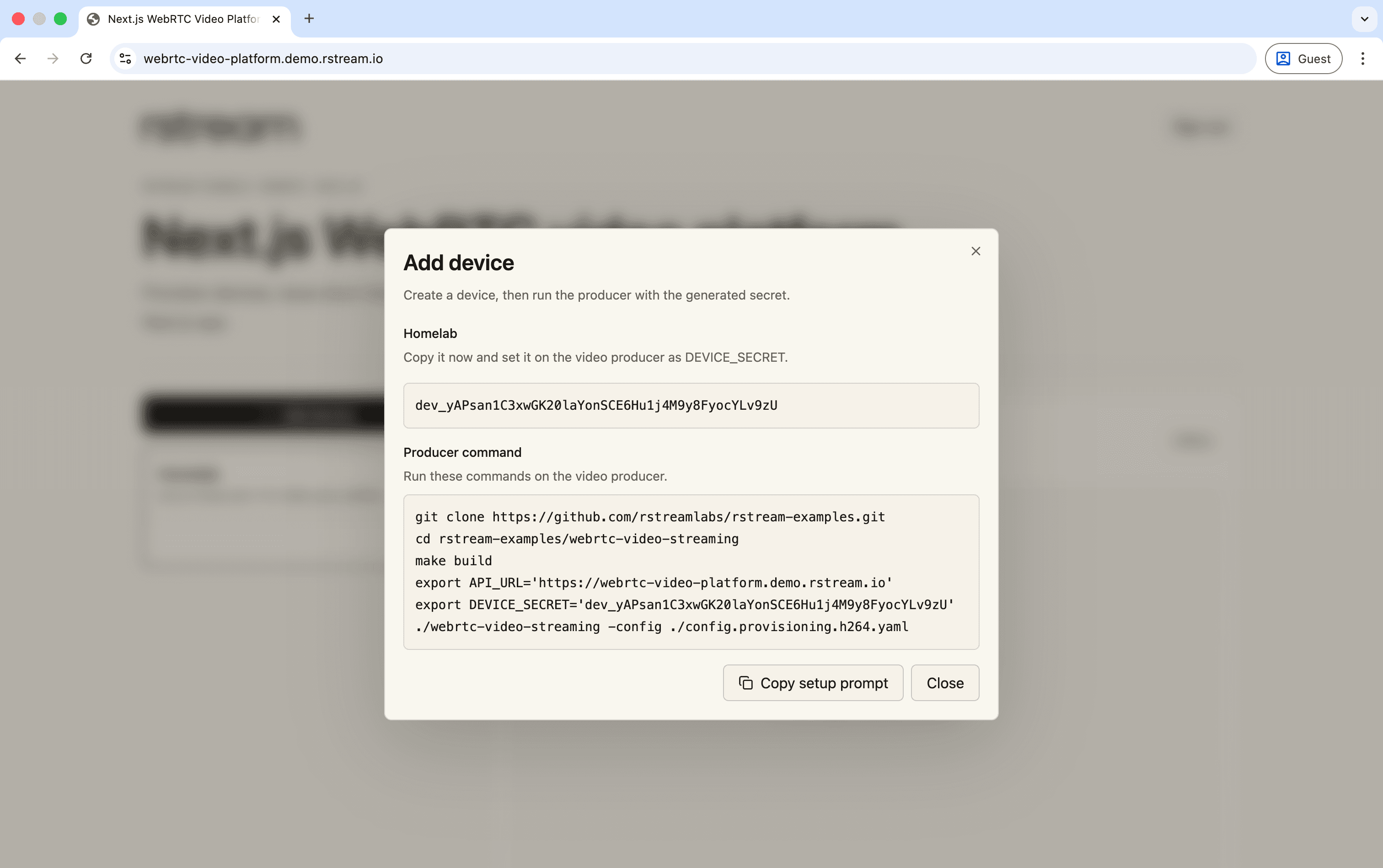
Device creation returns a one-time product secret. The producer uses that secret to ask the platform for short-lived rstream credentials.
Use the hosted demo
You can also use the hosted demo as the product backend.
https://webrtc-video-platform.demo.rstream.ioThe flow is the same. Sign in, create a device, copy the generated device secret, and run the producer with the demo URL as API_URL.
API_URL=https://webrtc-video-platform.demo.rstream.io \
DEVICE_SECRET=dev_... \
./webrtc-video-producer -config ./config.provisioning.h264.yaml
The demo is disposable. It is meant to make the producer flow easy to test without setting up a database, OAuth app, and Vercel project first. Demo data may be reset periodically.
Configure the rstream SDK once
Keep rstream setup behind a small server-side module. The module reads the environment, creates the configured client, and reuses it during local development.
import "server-only";

import { RstreamTunnelsClient } from "@rstreamlabs/tunnels";

import { rstreamEnv } from "@/lib/env";

const DEFAULT_RSTREAM_API_URL = "https://rstream.io";

declare global {
  var rstream: RstreamTunnelsClient | undefined;
}

function createRstreamClient() {
  const env = rstreamEnv();
  return new RstreamTunnelsClient({
    apiUrl: env.RSTREAM_API_URL ?? DEFAULT_RSTREAM_API_URL,
    credentials: {
      clientId: env.RSTREAM_CLIENT_ID,
      clientSecret: env.RSTREAM_CLIENT_SECRET,
    },
    engine: env.RSTREAM_ENGINE,
    projectId: env.RSTREAM_PROJECT_ID,
    projectEndpoint: env.RSTREAM_PROJECT_ENDPOINT,
  });
}

export function getRstreamClient() {
  if (process.env.NODE_ENV === "production") {
    return createRstreamClient();
  }
  if (!globalThis.rstream) {
    globalThis.rstream = createRstreamClient();
  }
  return globalThis.rstream;
}
That small boundary matters in a sample. It keeps SDK configuration in one predictable place. The rest of the code can then focus on product decisions and call rstream only where the product needs a tunnel token, TURN credentials, tunnel inventory, or a real-time tunnel watch.
Create a device secret
When a user creates a device, the platform creates a device record and returns a secret once. The database stores only a hash of that secret, plus stable metadata such as the device id, owner id, display name, and tunnel name.
The secret is a product credential, not a rstream credential. It authenticates the producer to the platform API. The platform then decides which short-lived rstream token or TURN credentials should be issued for that device.
The device does not receive a PAT, application credential, or account-level rstream token. It receives a product secret that can be revoked or rotated, and each rstream capability is minted on demand.
Provision the producer tunnel
The producer tunnel endpoint has one product responsibility and one rstream responsibility. It validates the device secret against the platform database, then mints the short-lived rstream token that lets this producer create its tunnel.
export async function tunnelPayload(device: Device) {
  const env = rstreamEnv();
  const [resolvedEngine, token] = await Promise.all([
    engine(),
    createTunnelToken(device),
  ]);
  return {
    device: device.id,
    engine: resolvedEngine,
    token,
    name: device.tunnelName,
    labels: labels(device),
    expires: new Date(
      Date.now() + env.DEVICE_TOKEN_TTL_SECONDS * 1000,
    ).toISOString(),
  };
}
client.auth.createAuthToken creates a token that only allows the expected published HTTP tunnel for that device.
export async function createTunnelToken(
  device: Pick<Device, "id" | "tunnelName" | "userId">,
) {
  const env = requireRstreamEnv();
  const rstream = getRstreamClient();
  const token = await rstream.auth.createAuthToken({
    expires_in: env.DEVICE_TOKEN_TTL_SECONDS,
    resources: {
      tunnels: {
        scopes: {
          tunnels: {
            create: {
              filters: {
                name: { exact: device.tunnelName },
                protocol: "http",
                publish: true,
                token_auth: true,
                labels: labels(device),
              },
            },
          },
        },
      },
    },
  });
  return token.token;
}
Those filters are the security boundary for the producer token. The producer can create its own tunnel, with the expected name, protocol, publication mode, token-auth requirement, and labels. It does not receive the application secret. It cannot create another device tunnel, publish a different tunnel type, or remove token authentication from the tunnel.
Issue TURN credentials on demand
TURN issuance is separate from tunnel provisioning. The producer calls the platform API whenever it needs fresh credentials. After the product API validates DEVICE_SECRET, it delegates credential generation to rstream.
const env = rstreamEnv();
const credentials = await getRstreamClient().turn.createCredentials({
  keyringBaseUrl: env.RSTREAM_TURN_KEYRING_BASE_URL,
  ttlSeconds: 10 * 60,
});
The returned URLs, username, and credential form the WebRTC ICE server passed to the producer or browser.
This separation keeps the operational boundaries clear. Tunnel provisioning creates the public WHEP surface. TURN credentials are network credentials with their own lifetime and can be refreshed independently for the WebRTC path. The producer receives those credentials without holding rstream application credentials.
Authorize the viewer
The viewer path starts from the product user, not from the device secret. When the dashboard opens a stream, the backend first checks product ownership. A user can only request a viewer payload for a device that belongs to that user.
Only after that product check does the backend look up the online rstream tunnel, create TURN credentials for the browser, mint a viewer token, and return the selected WHEP endpoint.
export async function viewerPayload(device: Device) {
  if (videoDistributorMode() === "mediamtx") {
    return mediaMTXViewerPayload(device);
  }
  const tunnel = await onlineTunnel(device);
  if (!tunnel) {
    return null;
  }
  const [token, turn] = await Promise.all([
    createViewerToken(device, tunnel),
    turnPayload(device.id),
  ]);
  const base = publicUrl(tunnel);
  if (!base) {
    return null;
  }
  return {
    distributor: {
      kind: "direct" as const,
      whep: `${base.replace(/\/$/, "")}/whep`,
      authorization: `Bearer ${token}`,
    },
    turn,
  };
}
The token only allows connection to the selected online tunnel's WHEP resource.
export async function createViewerToken(
  device: Pick<Device, "id" | "userId">,
  tunnel: Tunnel,
) {
  return createDeviceConnectToken(device, tunnel, "^/whep(?:/[^/?#]{1,256})?$");
}

async function createDeviceConnectToken(
  device: Pick<Device, "id" | "userId">,
  tunnel: Tunnel,
  pathRegex: string,
) {
  const env = requireRstreamEnv();
  const token = await getRstreamClient().auth.createAuthToken({
    expires_in: env.VIEWER_TOKEN_TTL_SECONDS,
    resources: {
      tunnels: {
        scopes: {
          tunnels: {
            connect: {
              filters: {
                id: tunnel.id,
                status: "online",
                protocol: "http",
                publish: true,
                token_auth: true,
                labels: labels(device),
              },
              params: {
                path: { regex: pathRegex },
              },
            },
          },
        },
      },
    },
  });
  return token.token;
}
That is the product integration pattern. The frontend asks the product API for access. The backend checks product ownership. The backend creates a short-lived rstream token that expresses the edge-level tunnel policy. The browser then creates and owns the WHEP resource returned by the backend.
If user A guesses the database id of a device owned by user B, the product query returns nothing and no rstream token is minted. If user A obtains a stale viewer payload, the token is short-lived. The token is also bound to one online tunnel and its WHEP resource paths, so it cannot be reused to browse the producer UI or connect to another device tunnel.
Watch tunnel state in real time
The dashboard should not infer online state from the device table. A device record only means that the product knows about a device. Online state comes from the rstream tunnel inventory.
The server mints a short-lived watch token for the dashboard. That token is restricted to listing published HTTP tunnels that belong to this sample and to the signed-in user. Browser watch streams send that token as rstream.token on the engine streaming endpoint, so the token is minted on demand and is not stored as durable browser session state. The token must carry the read-only engine permission and list-only tunnel resources; create or connect scopes belong to producer and viewer tokens, not to watch tokens.
This sample uses three separate token builders:
| Token | Used by | Resource shape |
|---|---|---|
| Producer token | Device-side producer provisioning | tunnels.create for one expected published HTTP tunnel and its labels |
| Viewer token | Browser WHEP requests to the producer tunnel | tunnels.connect for one online tunnel and its /whep resource paths |
| Watch token | Dashboard inventory stream through useRstream | tunnels.resources.read-only plus tunnels.list for the signed-in user's labelled tunnels |
const token = await rstream.auth.createAuthToken({
  expires_in: env.WATCH_TOKEN_TTL_SECONDS,
  permissions: ["tunnels.resources.read-only"],
  resources: {
    tunnels: {
      scopes: {
        tunnels: {
          list: {
            filters: {
              labels: {
                app: APP_LABEL,
                [USER_LABEL]: user.id,
              },
              protocol: "http",
              publish: true,
            },
          },
        },
      },
    },
  },
});
On the client side, the dashboard uses the React SDK helpers.
const watchOptions = useMemo(() => rstreamWatchOptions(watch), [watch]);
const rstream = useRstream(watchOptions);
const liveOnlineIds = useMemo(
  () => onlineDeviceIds(rstream.tunnels),
  [rstream.tunnels],
);
The mapping is label-based. Every tunnel created by the producer carries the application label, the owner user label, and the device id label. The dashboard reads the live tunnel list, extracts the device id label from online tunnels, and merges that status into the product device list.
function labels(device: Pick<Device, "id" | "userId">) {
  return {
    app: APP_LABEL,
    [DEVICE_LABEL]: device.id,
    [USER_LABEL]: device.userId,
  };
}
That keeps the UI responsive without building a separate polling loop or inventing a second online-state database.
For durable lifecycle state, add a project webhook on tunnel.created and tunnel.deleted and keep the same labels as the product key. The live watch stream tells the dashboard what is online now; webhook events let the backend persist fields such as onlineSince and lastSeenAt, rebuild device state after a restart, and run cleanup when a producer disappears.
For server-rendered snapshots or one-off checks, the backend can use the same labels through the tunnels SDK.
export async function onlineTunnel(
  device: Pick<Device, "id" | "tunnelName" | "userId">,
) {
  const rstream = getRstreamClient();
  const activeTunnels = await rstream.tunnels.list({
    limit: 20,
    filters: {
      name: device.tunnelName,
      status: "online",
      publish: true,
      protocol: "http",
      labels: labels(device),
    },
  });
  return newestTunnel(activeTunnels);
}
Fine-grained resources
Fine-grained resources.tunnels boundaries are the normal production path for this sample. They let the backend create tokens that are short-lived and constrained by tunnel name, tunnel id, labels, protocol, publication mode, status, and WHEP resource path.
That gives the application two layers of authorization.
- The product layer checks ownership in PostgreSQL and decides whether the signed-in user may access the device.
- The rstream layer receives a token that is already narrowed to the tunnel operation the caller needs.
The split is intentionally narrow.
| Caller | Token issued by the backend | Allowed operation | Not allowed |
|---|---|---|---|
| Dashboard | Watch token | List the signed-in user's sample tunnels to compute online state | Create tunnels or connect to tunnels |
| Browser viewer | Viewer token | Connect to one selected online tunnel on /whep and its resource paths | List tunnels, create tunnels, open the producer UI, or connect to another device |
| Video producer | Producer token | Create one published HTTP tunnel with the expected name, labels, and token authentication | List tunnels, connect to tunnels, create a tunnel for another device, or remove token authentication |
The browser does not get a broad project token, and the device does not get the application credential. Each runtime gets one short-lived token for one rstream operation.
The sample always issues producer, viewer, and watch tokens with resources.tunnels boundaries. The example is meant to show the production integration shape where product-layer authorization and rstream edge-level authorization work together.
Run the producer in platform mode
Build the device-side producer from the first sample.
cd ../producer
make build-provisioning
Then run it with the product API URL and the device secret.
API_URL=http://localhost:3000 \
DEVICE_SECRET=dev_... \
./webrtc-video-producer -config ./config.provisioning.h264.yaml
The provisioning profile disables the embedded product viewer and asks the platform for rstream configuration.
web:
  viewer:
    enabled: false
tunnel:
  provisioning:
    mode: remote
    endpoint: ${API_URL}
    secret: ${DEVICE_SECRET}
The producer still runs the same WebRTC and GStreamer code. It still serves WHEP locally and creates an rstream HTTP tunnel. The difference is that all rstream credentials and TURN credentials come from your platform API instead of a local CLI context.

Once the producer is running, live tunnel state marks the device online and the viewer connects through the short-lived URL issued by the platform.
The browser side uses WHEP offer/answer resources with Trickle ICE. The platform only selects and authorizes the WHEP endpoint and returns TURN credentials. It does not relay session requests or proxy media.
The Next.js app can run as a serverless product backend because WHEP and WebRTC terminate on the selected media backend, not on a Next.js route handler. The WebRTC implementation details remain in the sample repository and in the standalone guide.
Observe the producer in platform mode
Remote provisioning keeps the producer's OpenMetrics exporter unchanged. Enable it in the producer profile and let a collector beside the device scrape the loopback listener.
metrics:
  enabled: true
  listen: 127.0.0.1:9090
A vmagent on the device or edge host can scrape http://127.0.0.1:9090/metrics with a standard Prometheus target and remote-write it to the platform's metrics store.
scrape_configs:
  - job_name: video-producer
    static_configs:
      - targets: [127.0.0.1:9090]
        labels:
          producer: camera-01
The exporter keeps TWCC and encoder media targets separate from the pacer's wire budget and burst allowance, then adds capture freshness, frame cadence, encoded-media and paced-RTP throughput, loss, delay, pacing queues, adaptive updates, key-frame recovery, RTT-aware RTX suppression, and FlexFEC. Codec and enabled transport features describe the producer configuration. Fleet identity is attached once by the collector target, while viewer and session ids remain outside the label set. Keeping collection outside Next.js preserves the serverless boundary and gives fleet dashboards the producer-side evidence needed to distinguish device, encoder, access-link, and viewer-path failures. The standalone guide's producer observability section documents the metric relationships and initial queries.
Technical qualification
This guide qualifies the product boundary rather than repeating the media tests from the first guide. The same Next.js routes used by the interface exercise device provisioning, viewer authorization, WHEP lifecycle, live tunnel state, and backend selection.
Tests reject expired credentials, incorrect issuers or audiences, and access to another media path. They also interrupt negotiation, renew credentials, cancel active requests, and stop the selected distributor. Each WHEP resource must be released, and a distributor failure must return the shared player to a newly authorized direct session. A production build and the live edge profile cover the complete Next.js, rstream, TURN, and media-backend path.
The implementation and its verification commands remain together in the reference repository.
Extend the distribution architecture
This sample keeps one WebRTC session between the browser and the remote device, using direct ICE connectivity when available and TURN when required. That is the right shape for one viewer opening one device stream, and it remains the simplest path for diagnostics.
The third guide adds on-demand MediaMTX distribution to this architecture. The same producer provides one protected upstream to a media server, and MediaMTX redistributes it without multiplying device uplink usage. Capture, encoding, adaptive control, packet repair, instrumentation, and the browser player remain shared; VIDEO_DISTRIBUTOR is the deliberate point of variation.
The operational work still builds on the same rstream surfaces. Tunnel inventory, labels, connection logs, exports, and real-time events can feed support tooling, audit views, permissions, limits, and fleet operations.
For a device model, viewer policy, media topology, or provisioning flow tailored to your product, contact us.
Troubleshooting
An offline device should first be checked against live tunnel state, then against its provisioning response. A device that is online but cannot be viewed usually narrows the problem to viewer authorization, WHEP creation, or ICE; the browser request and producer logs identify which boundary rejected the session.
Keep the rstream edge token separate from the application bearer when diagnosing 401 responses. The former authorizes the published tunnel and path; the latter belongs to the media backend. Reusing one header for both hides the failing trust boundary.